
Being a web developer typically means you�ve probably been around computers your whole life.� This means that you�ve troubleshooted them, broke them, fixed them, fixed them for others, etc�� As time has gone by and I�ve dedicated myself to the art and craft of development, I�ve slowly drifted away from supporting computers.
However, I recently upgraded my work laptop from Windows 7 to Windows 8 � what a frustrating experience this was!� But not the purpose of this article, just part of the train tracks of a good story!
While attempting to upgrade my Dell, I was having no luck.� I kept getting an error after attempting to restart the computer with Windows 8 that the install was unsuccessful and my computer was reverted back to Windows 7.
As I was troubleshooting this issue, the main points for trial and error were around this tool MSConfig.� Honestly, I�ve never heard of it because I simply haven�t had any computer issues in a long time.� The forum I was reading indicated using this tool to disable start up services because apparently encryption or anti-virus software can somehow prevent the Windows 8 upgrade from happening.
The suggestion was two-fold.� Firstly you need to launch the tool by pressing Windows Key + R and typing �msconfig� in the run dialog.
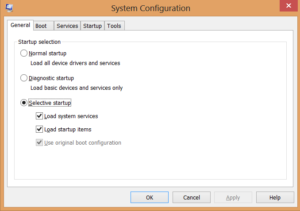
Step 1:
Select the �Selective startup� radio button Step 2:
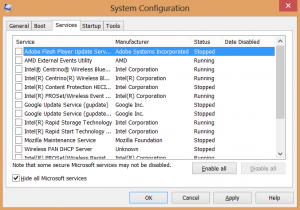
Select the Services tab, click the �Hide all Microsoft services� checkbox and then click �Disable all� After you complete these steps, a reboot will be required.� I�m sure you�ll notice that the restart is really quick since every non Microsoft service is now disabled.
Unfortunately this did not help me upgrading to Windows 8�
The long-and-short of that story is my Dell had some raid accelerator software installed that had to be disabled during the upgrade�that�s the nice and simple after math, but man was it frustrating before I was able to figure that out!
Skip a head 4 or 5 days now and my wife tells me this morning that her laptop is acting all weird.� Quick peak and diagnosis and she clearly has a virus�
MSConfig to the rescue!� Using my newly found knowledge of being able to quickly and easily disable all services � and if you notice beside the Services tab there is a Startup tab and this tab allows you to easily disable any applications that run during startup.� And of course, I�m sure you guessed it, right in that list was the virus itself.
So I quickly disabled, rebooted the laptop and voila the virus is disabled.
Was this was done; I simply restored her laptop from the most recent system restore point prior to the virus.� Everything is back to normal and I can stop being a desktop support person again! Published on Feb 11, 2013 Did you enjoy this article? If you did here are some more articles that I thought you will enjoy as they are very similar to the article
that you just finished reading.
Jamie Munro is the author of ASP.NET MVC 5 with Bootstrap and Knockout.js,
Knockout.js: Building Dynamic Client-Side Web Applications,
20 Recipes for Programming MVC 3,
and 20 Recipes for Programming PhoneGap. He has been developing websites and web applications for over 20 years. Jamie began his writing career in 2009. As the success of Jamie's blog grew, he turned his writing passion to books about web development in hopes that his many years of experience could be passed on to his readers. No matter the programming language you're looking to learn, I've hopefully compiled an incredible set of tutorials for you to learn; whether you are beginner
or an expert, there is something for everyone to learn. Each topic I go in-depth and provide many examples throughout. I can't wait for you to dig in
and improve your skillset with any of the tutorials below.
Related Posts

Tutorials
Learn how to code in HTML, CSS, JavaScript, Python, Ruby, PHP, Java, C#, SQL, and more.