
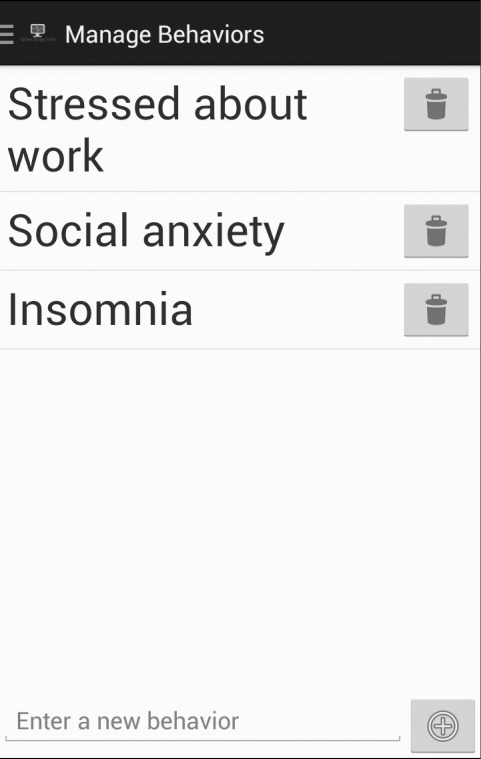
 During the creation of my first Android application � Behavior Therapy Tracker � I wanted to display a list of behaviors to manage; more importantly though, I wanted an easy way for users to add new behaviors to the list.
My solution to this problem was simple, add a one-liner form to the footer of my ListView that contained the behaviors.
I accomplished this by using the following XML layout:
The above layout contains a relative layout with an inner linear layout and a ListView element.
The LinearLayout contains my form.� The key pieces that allow this to work are the layout_alignParentBottom.� Inside this LinearLayout I have a simple EditText for form input and an ImageButton for adding a new behavior.� The height of the LinearLayout is set to wrap_content to ensure it only takes up as much height as required.
Outside of this LinearLayout contains my ListView that is populated by my activity.� The ListView has two important properties set.� Unlike the height of my LinearLayout, the ListView is set to fill_parent; meaning take up whatever space is left.� The other important setting is the layout_above is set to be above the type_footer (my LinearLayout id). Published on Sep 26, 2013 Tags: android
| Android
| Java
| listview
Did you enjoy this article? If you did here are some more articles that I thought you will enjoy as they are very similar to the article
that you just finished reading.
Jamie Munro is the author of ASP.NET MVC 5 with Bootstrap and Knockout.js,
Knockout.js: Building Dynamic Client-Side Web Applications,
20 Recipes for Programming MVC 3,
and 20 Recipes for Programming PhoneGap. He has been developing websites and web applications for over 20 years. Jamie began his writing career in 2009. As the success of Jamie's blog grew, he turned his writing passion to books about web development in hopes that his many years of experience could be passed on to his readers. No matter the programming language you're looking to learn, I've hopefully compiled an incredible set of tutorials for you to learn; whether you are beginner
or an expert, there is something for everyone to learn. Each topic I go in-depth and provide many examples throughout. I can't wait for you to dig in
and improve your skillset with any of the tutorials below.
<RelativeLayout xmlns:android=http://schemas.android.com/apk/res/android
    xmlns:tools=http://schemas.android.com/tools
    android:id="@+id/type_summary"
    android:layout_width="match_parent"
    android:layout_height="match_parent"
    android:orientation="horizontal">
    <LinearLayout
        android:id="@+id/type_footer"
        android:layout_width="match_parent"
        android:layout_height="wrap_content"
        android:orientation="horizontal"
        android:layout_alignParentBottom="true">
        <EditText
            android:id="@+id/behavior"
            android:layout_width="0dp"
            android:layout_height="wrap_content"
            android:layout_weight="1"
            android:hint="@string/message_behavior"
            android:singleLine="true" />
        <ImageButton
            android:id="@+id/add"
            android:layout_width="wrap_content"
            android:layout_height="wrap_content"
            android:src="@android:drawable/ic_menu_add"
            android:contentDescription="@string/button_add" />
    </LinearLayout>
    <ListView
        android:id="@android:id/list"
        android:layout_width="match_parent"
        android:layout_height="fill_parent"
        android:text=""
        android:layout_above="@id/type_footer" />
</RelativeLayout>
Related Posts

Tutorials
Learn how to code in HTML, CSS, JavaScript, Python, Ruby, PHP, Java, C#, SQL, and more.